Wednesday, August 14, 2013

Humble Bundle Origin Bundle! (With Steam keys)

Humble Bundle recently dropped their latest bundle, dubbed "The Humble Bundle Origin Bundle". They offer AAA games such as Dead Space, Burnout Paradise: The Ultimate Box, Crysis 2: Maximum edition, Mirror's Edge, Dead Space 3, and Medal of Honor. If you choose to pay above average, you will receive Battlefield Bad Company 3 and Sims 3 as well as the start pack for it. At first I thought this was strictly a Origin sale, but then I noticed that certain games had the Steam symbol underneath it. Turns out that Dead Space, Burnout, Crysis 2, Mirror's Edge, and Medal of Honor all offer Steam keys. For five dollars, this is practically a steal! They're all fantastic games and I can't wait to play some of them like Burnout and Mirror's Edge.


All the money goes to charity and Humble Bundle (since they need money to run their servers). The money doesn't go to EA, for all of you who hate EA, since EA has stated that they, as well as Origin, are giving their share of the money to charity. Overall, this is a fantastic bundle and I urge anyone and everyone take buy this bundle. It contains great games and it all goes for a great cause! 

Microsoft goes back on their word again!


Microsoft recently revealed the news that the Kinect is no longer required to be plugged in for the Xbox One to work. This is their second overturn in policy in three months, the first being DRM and used games issue. Although Microsoft was keen to attach the Kinect as an always on piece of technology, customers understood that there would be privacy issues, and after all the frights and scares concerning Edward Snowden, I'm not surprised Microsoft stepped down and decided to make the Kinect an optional feature.  

In doing so though, Microsoft shows that they don't really predict the future well and what consumers want. I am inclined to say that almost anyone would have guessed that not having used games and forcing a video/audio sensor to always be on would not work well with customers. Customers want freedom and various choices, and Microsoft practically obliterated that with their initial choices in policy. Microsoft could have easily made better choices in policy and presentation before news of the Xbox One even released.

I remember six or seven years ago when the Xbox 360 was hyped by Microsoft, and when the time came for the consoles to release, it was a legitimate competition. My friends were torn between Sony and Microsoft, and they weighed in every possible factor they could. It seems this time around, Sony has made a better case and will probably will this console war in the beginning.  It was poor planning on Microsoft's part, and Sony just did what any company would do if their competitor faltered, they capitalized on it. Microsoft is going to have to do more than just reverse poor policies, they are going to have to create new ones that entice their customers to stick with them and make them feel like spending the extra hundred dollars more on the Xbox one was worth it.. 

Tuesday, August 13, 2013

DigiTech RP 255 Multi Processor Pedal

I bought this stunning pedal three and a half years ago with no clear understanding of what the pedal could really do. At the time, I bought it because I wanted something that could generate a lot of effects and sounds without me having to spend a lot of money. I figured that if I found an amp model  or effect I really liked, I could buy the physical amp or effect pedal later on in life when had the necessary finances. I used it for making covers at home as well as a few original pieces here and there, but I was completely oblivious to the USB out embedded within the pedal.  Little did I know that this pedal with two switches and a foot pedal would blow me away and become an invaluable tool in me recording music.

This pedal contains 94 various stomp boxes and amplifier tones. The amplifiers are based off of famous models such as the Fender Twin Reverb and the immortal Marshall JCM 800/900, Mesa Boogie Dual Rectifier and the Vox AC30, tones that are so well known in rock and metal, as well as blues, that they can be identified by musicians within as seconds. The stomp boxes, also referred to as effects pedals, range from the most basic distortion pedals and delay, to a wah wah pedal and DigiTech's signature Whammy pedal. I'm inclined to say I bought this pedal for that effect alone. The whammy pedal that made the same wacky and crazy sounds that my favorite guitarist Tom Morello, from Rage Against The Machine, made on songs like Killing in the Name of and Clear the Lane simply inspired me.

With that being said, the pedal has a lot to offer. The physical build of the pedal itself is fantastic for the price. When you press down on the pedal, you can activate the wah pedal at any time. There is no physical button or switch for you to hit, it is all based on pressure. After using my Dunlop Crybaby wah pedal for a year, I sorely miss the physical button, but as time went on, I started to appreciate the "virtual button". You can reset the pedal's calibration so that you can recalibrate the amount of pressure you need to press down for the wah pedal. This kind of made up for the missing switch and I was able to successfully calibrate the pedal to the same pressure I would place on a real pedal. The two foot switches are strong and their main purpose is to switch between each preset. The preset themselves can be modified and completely altered so that you can have your own unique tone, within the pedal's parameters. I find myself always amazed at the sheer amount of options this pedal presents you with. I am able to switch between a crystal clean channel and a rough and dirty channel within seconds with only a slightly minuscule delay. The pedal comes with 60 drum presets and an onboard metronome that can go as high as 240 BPM. The drum presets are great to jam over and are good to play along with since you can adjust the BPM of the loop.

The pedal comes with X-Edit, a piece of software that I find pretty intuitive. Via a USB cable that is not provided, but is commonly used for connecting a printer to a PC, you can edit the settings of each preset via your laptop. I find this more useful then turning the dials for each effect and for each preset. It is really easy to navigate and it is simple enough to backup presets and save them for later. You are also able to download custom made tones that are made by people online that are compatible with this pedal. That in itself opens up a whole new door of possibilities and options for the guitar player. People online are still making presets and creating insanely interesting tones. The pedal has an aux and headphone out port so you can connect your iPod or laptop via 3.5mm cable in order to play along to tracks or lessons. The headphone out allows me to play in silence so that I don't bother my family with my music. As stated before, you can plug the pedal directly into your laptop via USB. This is simply invaluable when it comes to recording since you can just record without the use of microphones and amplifiers. The pedal even comes with Cubase LE 4, which is a recording software. It is great for beginners and the full version is used by professionals and amateurs alike. DigiTech spared no expense with the software and the production of this pedal.
This is essentially how I record. (From top the bottom)(Black)  Power cable. (Cream/beige) USB adapter that goes into laptop. I found printers use the same cable. (Green) 2 way 3.5 m.m. cable that goes into the laptop's headphone port so I can play to tracks. (Silver) Headphones that plug right in. (Golden) 1/4 inch Instrument Cable that goes right into my guitar. 
This pedal is quite possibly one of my greatest musical purchases so far. I thoroughly enjoy everything this pedal has to offer. A week or so ago, I emailed DigiTech with a question concerning my pedal and they were able to get back to me in a timely fashion with various responses, one of which solved my issue. The pedal is made out die cast and I trust that it is built to last. I hope in the future I am able to buy the RP 500 or the RP 355 because they can only get better from here. This pedal is also great for the college student on the go who cannot bring their Marshall JCM 900 with their 4x12 cabinet with them to college. With a power adapter, instrument cable and a set of headphones, you can jam away at your heart's content. Overall a stellar product. 

Saturday, August 10, 2013

Mighty Text SMS

Around mid April this year I became frustrated with my Samsung Galaxy S III. I had a Samsung Reality, a simple slide phone with an external keyboard, prior to my smartphone. I was used to a physical keyboard and although I am typing part of this post with my Galaxy, I still missed typing on a physical keyboard. My friend also has an iPhone and told me about an app he found that lets him send texts through his laptop. I found the idea insanely cool so I tried to find an Android equivalent for my phone. This application was the result of that search and I couldn't be more pleased.

Upon downloading the application you are prompted to sync your phone number and email to the account. After that you are given a website link to go to for your desktop or laptop. Once there you are given a barcode that can be scanned by your smartphone and then viola, your phone is synced to the application. The application can be opened on your desktop computer or laptop via a Google Chrome Extension or a Firefox extension. The extension essentially redirects you to your personalized Mighty Text website, and its is chock full of great features. The classic view is similar to Facebook's message layout where you have each contacts name in the order you messaged them. When you click on a contact's name, you are shown the conversation and a chat box that also allows emoticons and MMS. Under classic view is power view, and this blew me away at first. It shows the six most recent conversations and it gives you the ability to message any of them within this view. This is super useful for mass texting and keeping with various conversations without having to alternate between contacts. 

Photos/Videos is a mildly recent feature that was introduced to Mighty Text and it syncs the 20 or 30 most recent videos and pictures you have taken via your smartphone. They load up and they give you the option to delete them, save them to your laptop, or share them on social networking websites. This is insanely useful to me since I seldom plug in my phone to my laptop unless I need to add APK files to it. Mighty Text also syncs up all of your Contact into it's custom URL and you can view the phone numbers and emails attached to that contact. This actually saved me once when Gmail didn't sync my contacts to my email and Mighty Text had my contacts since I usually have to click "re sync" for the contacts to disappear. The settings menu gives a few options for the user such as whether they want their photos and video to sync or if they want popup notifications when they receive a message. I leave both of those settings on because I usually keep my phone on vibrate so I don't necessarily hear the text tone all the time. 

Power View. The bottom left has the battery and shows how much power your phone has left. 

Mighty Text SMS overall is a great app and I love using it. It has made my life a thousand times easier and it lets me respond to my friends and family faster than ever. It is a super convenient application and I would recommend it to anyone. 

HP Customer Service: Update


Here's the first HP Customer Service Complaint Post in case you missed it: http://poweredbyingenuity.blogspot.com/2013/08/hps-customer-service-well-get-it-back.html

I received my laptop back yesterday after a week and a half of not having it. I will admit they took a longer time the second time, but I didn't really have a problem with that since it would hopefully mean that they checked out the laptop more and made sure everything was working. Upon receiving the laptop I checked the bottom plate to see it fall off again. I inspected the plate yet again, and found that all the tabs on the plate were in line like they were supposed to be. They probably didn't put the plate in because they want the customer to do it so that if it breaks,  it is their fault and not HP's. Smart, but it didn't work on me.

After placing the plate in, I turned on the laptop to see that everything was as I left it. The OS was not tampered with and the very few settings I had set such as wallpaper and mouse speed remained intact. I quickly looked at the battery symbol and saw no error sign, so they did fix my issues after all. I could tell they replaced my battery because I put a pencil mark on top of the old battery so I would know if they fixed the original or simply discarded in interest of a new part. Everything seemed fine, and it was about time too since this was the second time in two weeks that I had to send my laptop into HP. I connected my Seagate 3TB external hard drive with USB 3.0 SuperSpeed support into my USB 3.0 ports to find it not spinning into life. I figured it was a simple driver issue and that it could be easily remedied by installing up to date drivers. But then I plugged in my flash drive into the 3.0 port, and switched the hard drive to my one remaining 2.0 port. My flash drive didn't even light up... There was no reaction, the port could have been dead for all I know.  I went into device manager and saw that the "Fresco Logic USB root hub" that interacts with the 3.0 USB ports was not installed and my laptop couldn't even detect one.

...So HP sends me a laptop with a missing driver? How convenient... If I were to send my laptop back to them a third time I would be completely irate with them and I would buy a new laptop. I waited until today to call them about the USB port issue since I had 90 days to call them. It took them a while, but they ended up deleting the folder that would normally handle that specific driver and then it ultimately worked. It's been a long journey with the laptop and dealing with HP's less than helpful customer service. Although they fixed all the issues in the end, I wish HP took more time to make sure that all the issues the customer addresses are actually fixed and that no new issues arise. I know it is tougher to predict the latter, but I am sure a company with research and development team such as HP's could solve that issue. With all of that being said.... My next laptop will not be an HP.

Thursday, August 8, 2013

GO SMS Pro

*I am using a Samsung Galaxy S III for this application review*

I downloaded this application months ago and I finally feel comfortable enough to write a review for this app since I am well acquainted with it. This app's main purpose is to replace the stock SMS app that Android offers you. I will admit that after a while, the stock application got really stale and tiring. I felt like I needed more and that I should be given more features than just messaging. This app goes above and beyond in that respect and it simply amazes me.

I'll start with the physical interface. The primary screen looks exactly like the stock Android Messaging application. They moved the attachment button to the bottom left as opposed to keeping it with the phone button on the top right and obviously changed the colors to make it more enticing for the user. The colors also help differentiate who sent what message since the stock application kind of blended it all together, using only a thin grey line as a divider. Otherwise, the main user interface is practically identical to the stock. What sets this application apart from the stock texting application is the features. 

When you swipe to the right, you are shown the what this app can really do. With this app, you can send scheduled text messages. You select the person or persons you will text along with the date and time the text should be sent as well as the content of the message. You are also given a notification when the text was sent, which I find useful since I tend to forget about scheduled messages at times. Another stellar feature is the ability to backup text messages. This is really useful if you’re switching phones, or want to delete the current messages, but still have a copy of them for whatever reason. They are backed up to the SD card within your phone and can be restored upon reinstallation of the application. You can also create a schedule for the backups, so you won’t have worry about important text messages or MMS’s not being up to date. SMS Blocker is another invaluable feature, giving you the power to block those pesky spam messages and old contacts you simply do not want to talk to. At the very top of the menu is the Theme button. This offers you, the important user, the option to change the physical display of the UI. Since I prefer the layout of an iPhone, with the freedom of a Android, I have the iPhone theme set up for my messages. The GO SMS community also offers Windows Phone styled messages as well as custom themes and colors.

GO SMS Pro also has chat heads and pop-ups, similar to Facebook Messanger and the iPhone lock screen respectively. The chat heads simply pop up in the top right hand corner of your screen with a little number that represents the messages sent by them. It’s useful if you like chat heads and prefer quick accessibility to texting them. I don’t find myself using it as much since I don’t really like the look of the chat heads themselves, but it can come in handy.

Swiping to the left brings up the contact list in a neat and clean manner. When you click on someone’s name, you bring up the chat conversation for them. It’s a clean design and very intuitive. I use it on occasion when I cannot remember someone’s number or if I don’t remember the name they have in my phone. Pressing the menu button brings up the third and final panel of settings. Some of the settings overlap such as Auto Reply and Theme, but there are other settings as well, some that are quite handy. The Search function is exactly what it sounds like, a searching tool. It lets you search by contact name or content. Typing in keywords for content brings up any text message that you has what you searched for. The screenshot function helps screenshot text message strings. It works by shaking the phone, but it seems a bit buggy. I lifted up my phone and that counted as a shake It could get quite annoying after a while, but you wouldn’t leave the setting on for that long. Once the photo is taken, it lets you use a white brush to white out any text you don’t want visible. This is a fantastic idea and works great! Then you are given the option to save the image or share on what I assume would be social networking websites. I would delve into the option that says settings, but I’d be here for hours. Essentially, you can change the font size, color, and style of practically anything in the app from time stamps to the contact’s name.


GO SMS Pro is a fantastic texting application alternative and I love using it. I have been using it for about four months now and enjoy using it everyday. They give me so much freedom in how I want everything to look, and they wrap everything up in a nice clean format. There is no hassle, hours will not be spent trying to find the settings menu (I hope!) and the features the application offers go above and beyond any of my initial expectations. I am thoroughly pleased with the application and recommend it to anyone.

GO SMS Pro: https://play.google.com/store/apps/details?id=com.jb.gosms

Wednesday, August 7, 2013

Band of The Week #3 - Atreyu

Orange County’s Atreyu is this week’s band of the week. They formed in 1998 and released their EP Fractures in the Façade of Your Porcelain Beauty with the underground label Tribunal Records. In 2001, they were quickly signed to Victory Records where, in my opinion, they released some of their best work. Their debut album Suicide Notes and Butterfly Kisses released in 2002, followed by their 2004 release of The Curse. It is probably my favorite album by them and it has a lot of great tracks such as Demonology and Heartache, This Flesh A Tomb, and The Crimson. The album introduced their drummer Brandon Saller as the clean vocalist while their lead singer/ screamer Alex Varkatzas did the unclean vocals/ screams as he had done on their debut album. This album definitely garnered them a lot of attention with metalcore fans all around. Their third album A Deathgrip On Yesterday reached just as much popularity as their sophomore record. At this point in their career, they had their songs in video games and a couple of movie soundtracks, thus getting them more attention. Possibly their most well known release is their fourth studio album Lead Sails and Paper Anchors. It was also the first album under their two new record labels Roadrunner and Hollywood Records. This album relied more on the clean vocals than then the unclean vocals, but Alex’s parts were still quite memorable. Songs such as Becoming the Bull, Two Become One, and Falling Down became instant hits with the fans. Their song Falling Down was even included in Guitar Hero: On Tour “Modern Hits”. Their fifth album Congregation of the Damned, is their most recent album that released in 2009. They received lots of attention for this record, but their fans also considering this album to be a complete sellout in comparison to their older material

The first song I heard by Atreyu was Becoming the Bull. It was such a hard rock track and it always got me pumped to play video games when I was younger. I listened to other tracks of Lead Sails and Paper Anchors, but I didn’t really listen to their other stuff because at the time I didn’t like unclean vocals. As time went on, I got into unclean vocals and went back to listen to their older material such as The Curse and A Deathgrip on Yesterday. I was completely floored by how good these tracks were and the overall presentation of the album. To me, they were a band that was able to combine the grittiness of unclean vocals and the melody of cleans vocals in such an interesting fashion that it made me want to listen to more of their work. Dan Jacobs on guitar is no joke either with a tight rhythm section and blistering solos and licks in between. Some people didn’t like the idea of Brandon on clean vocals because they wanted Atreyu to remain “heavy”, but I felt it was a good change and it added a lot of new dynamics to the band. It gave them a wider audience and it showed how far they could push themselves as musicians

They are one of my favorite metalcore bands and they have immense talent, it was sad to see them go on hiatus, but I guess every band needs to take time off to recuperate from all the touring and music production. With that being said, there is news that they might record a new track for the fans as a way to thank them for all of their love and support and that the song would sound like something that would have been released on their second album The Curse.


Sonic Adventure Battle 2

Background:
It feels like it has been thousands of years since I purchased Sonic Adventure Battle 2. I remember going to my cousin's house back in 2004 and they were playing it on their Nintendo GameCube. The graphics blew me away and the storyline was intense. I went home that night and ordered the game online, a game that I devoted hundreds of hours to for the next nine years.

Upon browsing Amazon's deals during their summer sales for online games, I found the very same Sonic game I bought nine years ago on sale for $1.25! To sweeten the deal, the DRM was Steam! I quickly bought the game and the the DLC that came with it (which was the multiplayer content that was included in the original game) for .49¢.


One of my main reasons for buying it was that I didn’t want to apply wear and tear to the disc, which had a few scratches on it. Since this game was ported to the PC I will discuss any changes as well as the overall performance of the game.

Plot:
My laptop has been in the shop for a while due to various issues that you can read about in my HP post below, so I am currently using an HP ENVY m6 that has an Intel ® HD Graphics 4000 video card. The game looks stellar as I remember it. The Campaign mode to me was pretty unique. You could either play the Hero story line, or the Dark Storyline. Both storylines tell the same story, but each storyline has their own unique events that contribute to the overall plot. I personally recommend you play the Dark Storyline first because it contains the beginning plot line. The Hero storyline kind of just drops you into the midst of things, with no real understanding of what’s going on. Within the hero storyline, you play as Sonic the Hedgehog, Knuckles the Echidna, and Miles Tails Prower. To reflect this, the Dark story line lets you play as Shadow the Hedgehog, Rouge the Bat, or Dr. Eggman.

The missions themselves are divided into three categories. Sonic and Shadow have the typical platformer styled missions where your initial goal is to get from Point A to Point B. Knuckles and Rouge emerald hunts in which they have to find three pieces of the Master Emerald that are scattered across a stage. Tails and Dr. Eggman have a similar mission layout in comparison to Sonic and Shadow, but they battle in mechanized
robot walkers. The missions as a whole are very fun and the game increase in difficulty in such a clean manner that it feels natural. The storyline leaves virtually no loose end untied and makes sure to inform the gamer of all that happened, something I appreciated after playing many games that neglected to finish up certain parts of the stories. The artwork itself is amazing and still remains as stunning when played on PC. There were a few lag issues here and there, but nothing major that completely turned me off to the game.Upon finishing a mission, the game gives the player a Sonic Emblem. There are a total of 180 emblems in all. This was particularly fun for me since I am a completionist and do my best to 100% finish a game if I can.

Features:
The added bonus to this is that you can obtain more Chao eggs for your Chao garden. This adds replay value for the game, but only if you’re interested in the Chaos and the Chao Garden. The Chao Garden is a great feature of the game where you raise Chao eggs and let them grow and compete in tournaments. This feature alone is why a lot of people bought the game once it was ported to the PC. You can buy new Chao eggs so that you have different colors and if you raise them correctly, they can replicate actual characters in the same such as Sonic, Tails, Shadow etc. It is an insanely cool feature that makes the game last so much longer.

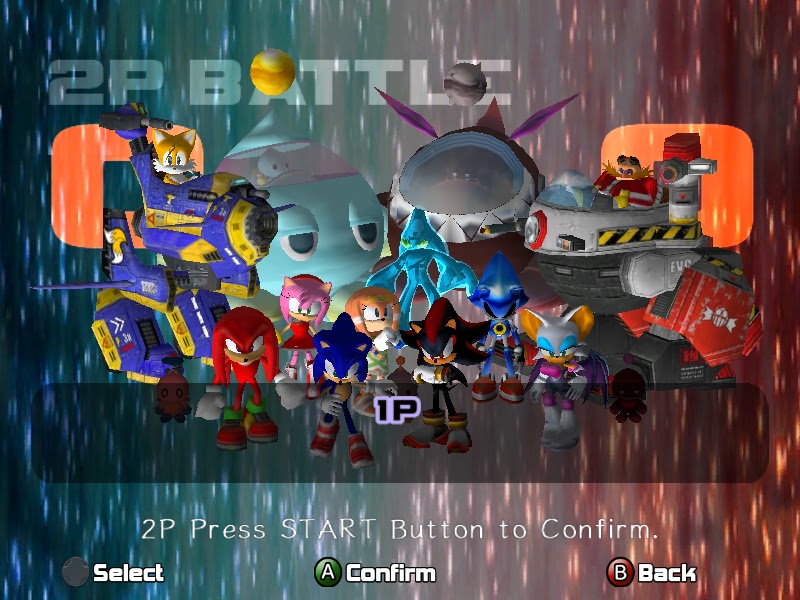
The multiplayer feature of the game is pretty cool to, but I don’t find myself playing it as much. Players can have action races battles where you can play as Sonic, Shadow, Amy, or Metal Sonic and race the other two the finish line. They are action packed races and I will admit if I had friends that played this game more often, this would be all that I play. The levels are thrilling and they reflect the levels that are within the storyline. Treasure hunt missions are exactly what the campaign missions are like except you have two people hunting for three gems. The one who finds two of the three gems wins! You can play as Knuckles, Rouge, Tikal the Echidna, and Chaos 0. The two player games also offers shooting games where the player plays as either Tails, Eggman, ChaoWalker or Dark ChaoWalker. The players are places on platforms in a 2-D manner and they have to defeat each other. The remaining mini games are the Kart Race, where players can race each other (Can also be done in single player mode), Chao Karate and Chao Race where you can pit your Chaos against the CPU and the other player to see who wins.

It still blows my mind to this day that a game this well produced and made released in 2003. The game physically looks years ahead of its time and although the camera control is a little shaky in places, it is overall fantastic. The missions and story line remain the same and the Chao Garden looks amazing in HD. This game has a lot of replay value if you are interested in Chaos. The missions are fun and enticing and they detailed. This game in particular brought me back to my childhood and it was fun playing it again. The game has had some issues with it crashing upon clicking “Save Settings”, but I don’t have this issue. Fair warning though, SEGA doesn’t not offer refunds on these games so if you do buy the game, see if there is a way to figure out if your drivers are compatible with the game.  I fully recommend this game to any Sonic fan or anyone who is a fan of a cool 3-D platformer that happens to include everyone’s favorite blue hedgehog. 

Sunday, August 4, 2013

Spectraball

I picked this game up from a Groupees bundle. It was the first game I ever saw on Steam and it looked so cool! You play as this little ball and you have to get through the level and all of the obstacles it offers. There are ten levels in total I believe and each is focused on a certain scenery. For example, the first level is in a tropical area, whereas the second level is situated in a desert with pyramids. These sceneries are very well done and it was probably the first thing that got my attention about this game. What I really liked about this game is that every object and obstacle used fit the overall level. In the level “Sky Ruins” there are turbines, windmills and large ramps that provide lots of air time. It all felt in place and nothing stood out like a sore thumb in a negative manner. The levels themselves are quite difficult at certain parts. I recall getting stuck on the mission “Sky Ruins” for quite a while due to how spaced how certain platforms were.

Although the game has keyboard controls, they seemed kind of shaky to me, so I played using an Xbox 360 Controller instead. Those controls felt much better to me and they were much more fluid. You move with the Left D-Pad and change your angle and view with the Right D-Pad. Pressing the A button makes you jump and B activates your ability. The ability you have by default is the Power Brake which, when pressed, causes you to immediately stop moving wherever you are. This is useful if you overshot a jump and you’re right above the platform because you’ll just drop to the ground like a dead weight.  Other abilities include teleport beacon which lets you set a teleport beacon anywhere that you can teleport to once before it disappears, or double jump which is pretty much self explanatory. Upon beating a level in Spectraball, you unlock the skin for that level. It’s just a cute little way to add some replay value to the game and make the game just a little bit more appealing to some people.

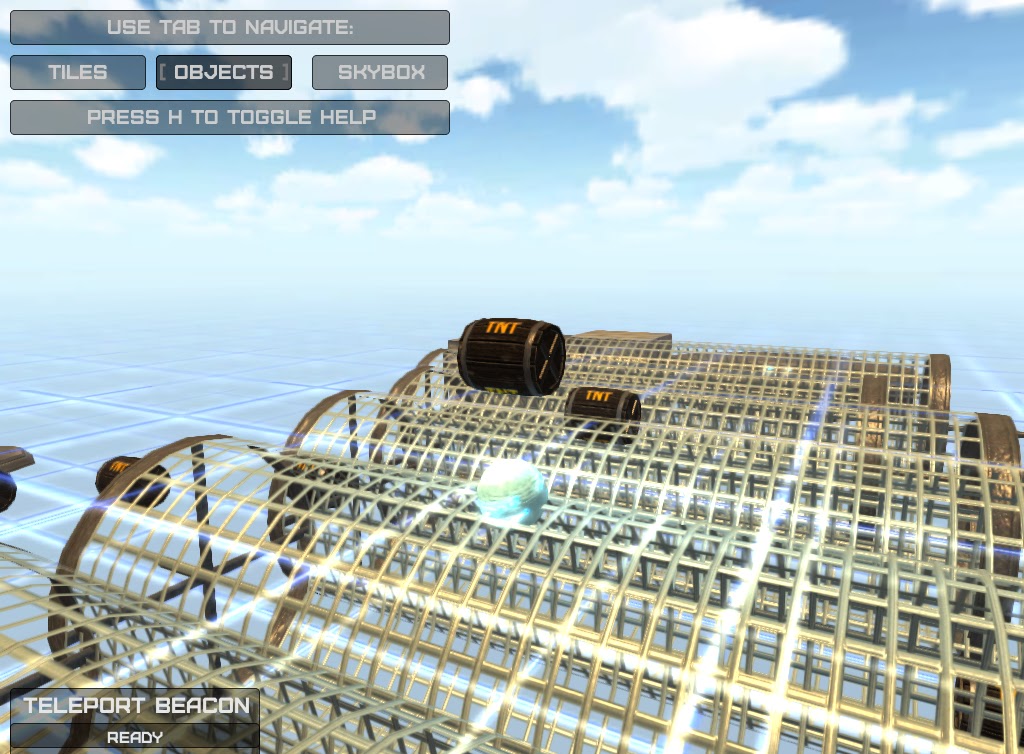
The game also offers a few mini games for the user to play. The first one is simply called Arena. You are situated on a circle platform and are attacked from four corners of the level by other spectraballs. They try to knock you off the platform and you have to fend them off and survive as long as you can. The platform tilts and turns so you can easily slide off, or slide your opponents off, it is quite fun. The next one is called Laser jump. You are in a large room that is reminiscent of Portal 2 and a laser glides across the floor. Your goal is to dodge the laser for as long as you can, and it gets quite tense as the laser speeds up and is quickly whirring across the floor. The last mini game provided is Crate Chaos, which I found the most enjoyable and frustrating. You are dropped from a height and you have a single crate below you which you have to land on. The crate turns out to be a TNT bomb, and you are launched back up into the sky while a new crate respawns somewhere else. You essentially have to crate jump from crate to crate as long as you can and survive. These mini games provided a little bit of enjoyment for me, but there weren’t as addicting as I thought they would be.

Surprisingly enough, the game has a lot of replay value. I re downloaded this game to the review since I beat this game upon receiving it and I found playing it again fun and relaxing… almost. A great feature this game has in the in game custom map downloader. Fans can make custom maps and publish them for others to play, thus extending the life of the game and how long you play. Although a lot of AAA games such as Counter Strike: Global Offensive, Garry’s Mod and Portal 2 have custom maps and gametypes, it was really cool to see a lesser known game such as Spectraball have it. The game uses an in game map building mode that is a mix of Halo 3’s Forge and the map building feature that appears in the Super Smash Bros. Brawl. The pieces resemble Brawl, but it is in 3-D and works better. Even in the stage building mode, you still appear as the little Spectraball with an object above you that you can place down at anytime. Within a couple of minutes, I was able to build my own map and test it out. Spectraball offers a lot of cool features and is well worth the five dollars it is available for on Steam.

Friday, August 2, 2013

HP's Customer Service- "We'll get it back to you fast, but we won't fix everything"

My HP Pavillion DV-6t had recently succumbed to a lot of issues such as a poor heat sink, USB ports not working, the letter ‘a’ on the keyboard not working, as well as the latch for the battery getting jammed and my hard drive crashing. I was pretty bummed about this, especially since the Steam Summer Sale had just ended and I was getting ready to play a bunch of games, as well as record music with my friend.  The laptop would become extremely hot, even upon booting it up and only using 1.95 GB of RAM. I contacted Costco Concierge Services since that is where I bought my laptop from, and they made matters worse due to a recommendation to restore my system image, which ultimately lead to my hard drive crashing. They linked me to HP Hardware Tech Support who also attempted to help me and assess my situation While we discussed my laptop, I mentioned every single issue I had with my laptop up until that point and I even asked him to repeat the list back to me so I could make sure he got everything. He claimed he did, and said a box would be at my doorstep tomorrow morning so that I could ship my laptop to them. It should also be noted that I asked him if all my issues fell under my available hardware warranty and he said yes.

As promised, the box was there the next day. They were fast, but this will prove to be their downfall. To rehash, I had the following issues with my laptop

  1. Letter 'a' was not working
  2. USB ports did not work consistently/ at all
  3. Heating issues (Heat sink)
  4. Hard drive crashed 
  5. Battery latch stuck (also forcing the HP Smart Guard case to come off and not go back into place, this could be considered a sixth issue...)
They were kind enough to keep me updated on the progress of my laptop via email and they said I would have my laptop back by August 2nd, which is technically today (I'm writing this at 5 a.m.). I instead got my laptop back three days later, thinking "Boy do they work fast!" I was elated to have my laptop back, and I quickly inspected the laptop upon removing it from the clear plastic it was wrapped in. My first problem arose, the HP Smart Guard case came off. Upon further inspection, I found out that the tabs on the thin plastic case broke off upon arrival. This got me annoyed, but I decided to turn the laptop on and try it out for a little bit before I made a final judgement. After running the initial setup and getting my user profile up and running, I noted they replaced my keyboard. I expected them to do this, and I tested out every key to make sure it was all in working order, it was. My laptop was also silent, except for what I can assume was the fan running within the laptop. The hard drive was also fixed obviously because the laptop was running fine so that's essentially three out of my five issues solved. 

I plugged in my laptop to the AC Adapter because I figured that it might not be fully charged upon arrival. This is when my second issue came up. My battery icon was blinking on the bottom right with an error symbol imposed on top of it. Uh-Oh, this can't be good! I placed my mouse on top of the icon to read the following "Battery is at 99%, please replace the battery." Replace the battery, why should I even have this error. I did not tell HP to tamper with my battery, or anything of the sort. I did say fix the battery LATCH that was jammed, which is also apparently a common issue that they can't offer a fix for. HP supplied with a number to call if I had any issues with my newly 'fixed' laptop inside the box I got my laptop back in, so I called HP back and told them of my new issues. I was completely and utterly furious. 

Did they even bother to inspect the laptop once they 'fixed' it? I was hoping they would have at least checked to see if everything was up and running and physically working. I should have to contact them a SECOND time to tell them of new issues within a mere ten minute use of my laptop. I would rather wait until August 2nd and have a FULLY working laptop that I can use, as opposed to receiving some half fixed piece of crap from HP. I don't want the laptop back as fast as possible with only have the issues solved. What irks me the most is that they provided me with a window of time in which I wouldn't have my laptop. Most companies would fix the issues and make sure that the things they fixed actually work, and then ship it back, but not HP. No, HP will 'fix' the product, and ship it back so fast, the glue they used to fix it would still be drying! HP's customer service is utterly terrible and they rely more on speed than actually solving the issues at hand, and that is why I will never buy an HP laptop or computer again.